
GitHub: https://github.com/ynakao55/booklog
Ruby on Rails+ PostgreSQLを使ってブックログサービスを作成・公開しました。
この記事では、アプリの説明/学んだ技術/主要ファイル/Dockerでのデプロイ要点をまとめました。
これ一つで、Webアプリ開発の基本要素が一通り体験できます。
目次
1. アプリの説明
1-1. 何をするアプリ?
読んだ本(タイトル/著者/ステータス/メモ)を登録・一覧・詳細表示できるシンプルな読書ログです。
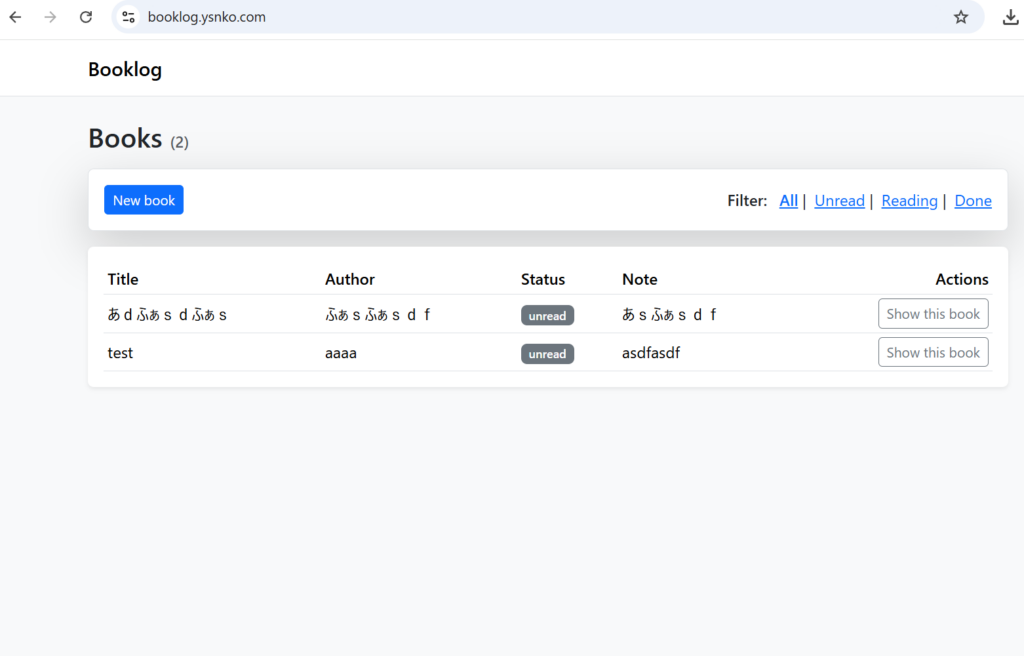
トップのヘッダに [New book] + フィルタ(All / Unread / Reading / Done) をまとめ、下段に一覧テーブルを表示します。Note は一覧では先頭10文字だけ表示(詳細で全文)。
1-2. 主な機能
- 本の CRUD(登録 / 一覧 / 詳細 / 削除)
- ステータス管理(
enum:unread/reading/done) - ステータス別フィルタ(クエリ or タブリンク)
- バリデーション(
title/author/status必須) - Note のトリム表示(一覧は10文字 + 省略記号)
- ベースレイアウトでヘッダ/一覧を視覚分離
1-3. 技術スタック
- Backend: Ruby on Rails 8.x
- DB: PostgreSQL
- (Rails 8)Solid Queue / Solid Cache に対応(同一DBロール運用)
2. 学んだ技術とハマりどころ
2-1) Rails 8 の Solid 系(Queue/Cache)
- 学び: Rails 8はSolid Queue(ジョブ)とSolid Cache(キャッシュ)がデフォルトで読み込まれ、
queueとcacheのDBロールが必要。 - ハマり:
The 'queue' (or 'cache') database is not configuredで起動失敗。 - 対応:
config/database.ymlのproductionにqueue:cache:(さらにcable:)をprimary継承で追加。初回はrails g solid_queue:install/rails g solid_cache:install→ migrate。
2-2) enum と Strong Parameters
- 学び:
enumは シンボル名文字列で受け取るのが安全(例:"unread")。 - ハマり:
"1"のような数値文字列を直接送ると'1' is not a valid status。 - 対応: フォームの
<select>は value をunread/reading/doneに。コントローラはpermit(:status)。
2-4) レイアウトと部分テンプレート
- 学び: 共通ヘッダ([New book] + フィルタ)と一覧本体を明確に分離すると、UIがすっきり。
- 実装:
application.html.erb(ベース)にヘッダ枠、一覧はbooks/index.html.erbのテーブルで。
2-5) Note のトリム
- 学び: ビューで
note&.truncate(10)を使うと一発。 - コツ:
nil耐性のため&.を使う/空文字にはダッシュ等を表示。
3. 主要なファイルの説明(抜粋)
3-1) app/models/book.rb
class Book < ApplicationRecord
  enum status: { unread: 0, reading: 1, done: 2 }
  validates :title, :author, :status, presence: true
end
3-2) app/controllers/books_controller.rb(抜粋)
class BooksController < ApplicationController
  before_action :set_book, only: %i[show destroy]

  def index
    @status = params[:status]
    @books  = if Book.statuses.key?(@status)
                Book.public_send(@status).order(created_at: :desc)
              else
                Book.order(created_at: :desc)
              end
  end

  def new
    @book = Book.new
  end

  def create
    @book = Book.new(book_params)
    if @book.save
      redirect_to books_path(status: params[:status]), notice: "Book created"
    else
      render :new, status: :unprocessable_entity
    end
  end

  def show; end

  def destroy
    @book.destroy
    redirect_to books_path(status: params[:status]), notice: "Book deleted"
  end

  private

  def set_book
    @book = Book.find(params[:id])
  end

  def book_params
    params.require(:book).permit(:title, :author, :status, :note)
  end
end
3-3) app/views/layouts/application.html.erb(ヘッダ分離の例)
<!DOCTYPE html>
<html>
  <head>
    <title>Booklog</title>
    <%= csrf_meta_tags %>
    <%= csp_meta_tag %>
    <%= stylesheet_link_tag "application", "data-turbo-track": "reload" %>
    <%= javascript_include_tag "application", "data-turbo-track": "reload", defer: true %>
  </head>
  <body>
    <header class="container">
      <nav>
        <%= link_to "[New book]", new_book_path, class: "btn" %>
        <span> Filter:
          <%= link_to "All",   books_path %> |
          <%= link_to "Unread",  books_path(status: :unread) %> |
          <%= link_to "Reading", books_path(status: :reading) %> |
          <%= link_to "Done",    books_path(status: :done) %>
        </span>
      </nav>
      <hr>
    </header>

    <main class="container">
      <% if notice %><p class="notice"><%= notice %></p><% end %>
      <%= yield %>
    </main>
  </body>
</html>
3-4) app/views/books/index.html.erb(テーブル + Note トリム)
<h1>Books</h1>

<table>
  <thead>
    <tr>
      <th>Title</th><th>Author</th><th>Status</th><th>Note</th><th></th>
    </tr>
  </thead>
  <tbody>
    <% @books.each do |book| %>
      <tr>
        <td><%= book.title %></td>
        <td><%= book.author %></td>
        <td><%= book.status %></td>
        <td><%= book.note.present? ? book.note.truncate(10) : "—" %></td>
        <td><%= link_to "Show", book_path(book) %></td>
      </tr>
    <% end %>
  </tbody>
</table>
3-5) config/routes.rb
Rails.application.routes.draw do
  root "books#index"
  resources :books, only: %i[index new create show destroy]
end
3-6) config/database.yml(production の Solid ロール)
production:
  primary: &primary
    url: <%= ENV["DATABASE_URL"] %> # ← Render: 末尾に ?sslmode=require
    pool: <%= ENV.fetch("RAILS_MAX_THREADS", 5) %>

  queue:
    <<: *primary

  cable:
    <<: *primary

  cache:
    <<: *primary
3-7) config/environments/production.rb(一例)
# Solid Cache を使わずメモリにしたい場合(暫定)
# config.cache_store = :memory_store

# ジョブを使わず async にしたい場合(暫定)
# config.active_job.queue_adapter = :async
4.booklog の実行方法(ローカル / Web)
ここからは、URL短縮アプリ booklog の実行方法をまとめます。
ローカル環境(WSL + Docker)で動かす方法と、公開リンクから試す方法の両方を記載しています。
ローカルで実行する方法(Docker / WSL)
前提
- WSL(Windows Subsystem for Linux)がインストール済み
- Docker Desktop がインストール済み
- WSL と Docker の連携設定(WSL integration)が有効
1. Git をインストール(未インストールの場合)
sudo apt update
sudo apt install -y git
2. リポジトリをクローン
git clone https://github.com/ynakao55/booklog.git
cd booklog
3. Docker Compose で起動
通常の起動 / 停止
docker compose up -d --build
docker compose down
確実に作り直して起動したい場合(推奨)
コンテナ・ボリューム・不要な関連コンテナも整理してから再作成します。
docker compose down -v --remove-orphans
docker compose up -d --build --force-recreate
4. ブラウザで開く
起動後、ブラウザで以下のURLを開きます。
http://localhost:3000
公開リンクから実行する方法(Web)
以下の公開URLからアクセスできます。
ローカル実行時補足(トラブルシュート)
コンテナの状態を確認
docker compose psログを確認
docker compose logs -f画面が開かない / 反映されない場合
docker compose down -v --remove-orphans
docker compose up -d --build --force-recreate
5. スクリーンショット
5-1)トップページ
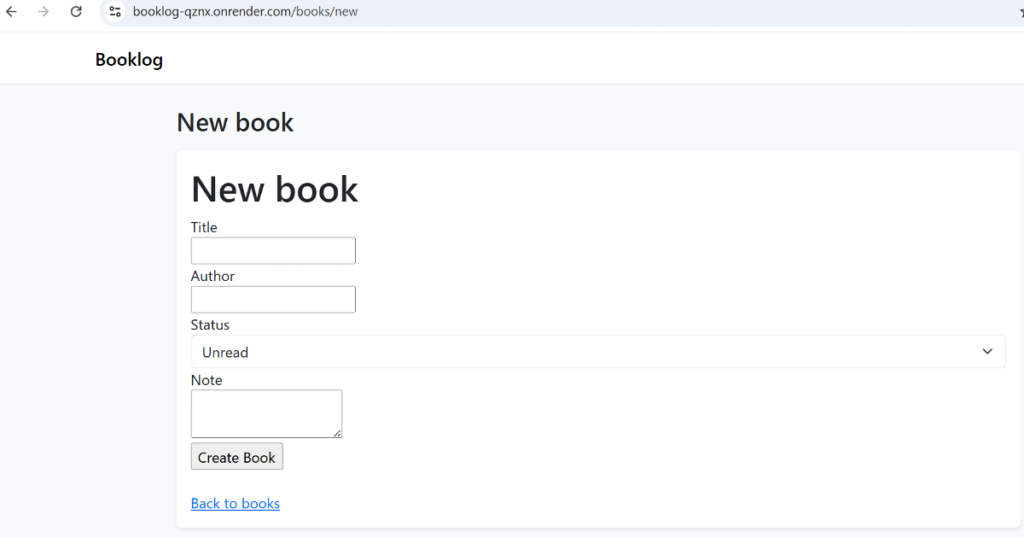
5-2)新規追加ページ
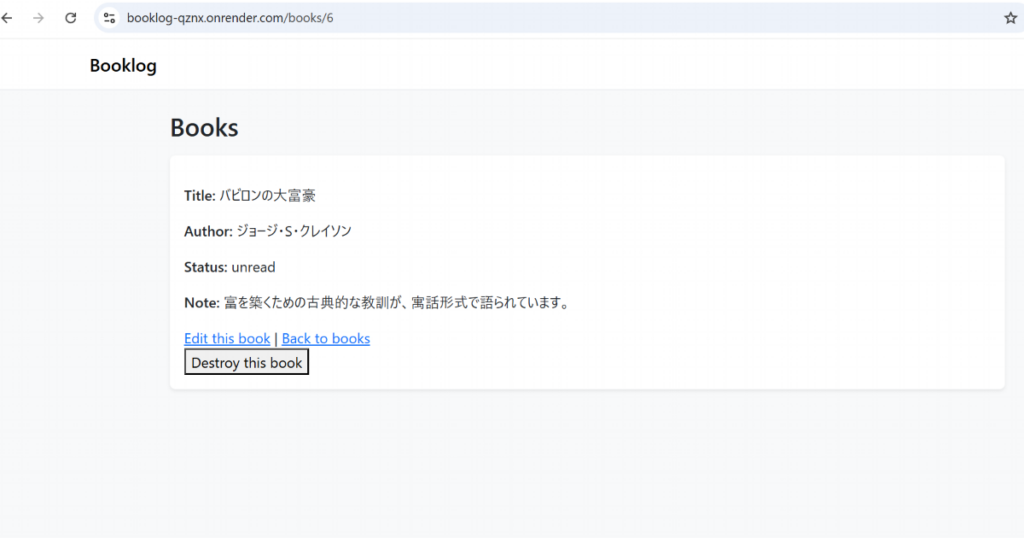
5-3)詳細ページ
6. まとめ
Rails 8 + PostgreSQL で作る最小構成の読書ログです。
ポートフォリオとして、「Railsで作って実環境にデプロイ」までを一気通貫で示せるように仕上げました。

コメント